
Playbooks · Automation audits · 7 min
AI Automation Kill Switch: Stop a Bad Bot and Recover Customers
When an AI bot goes wrong in front of customers, stop it fast, handle what it already queued and send a human correction. A kill-switch and recovery plan.
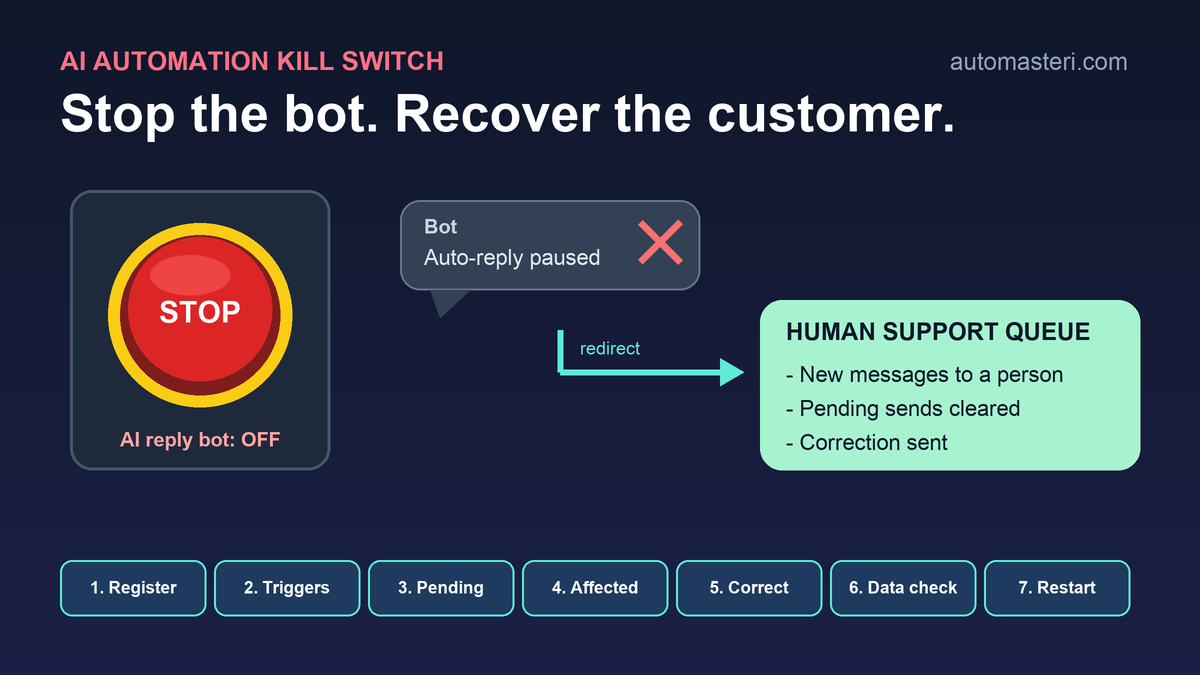
Why kill switches are in the news this month
On 13 October 2026, The Christian Science Monitor reported that US policymakers are pushing for an AI "kill switch", the same idea as the emergency cut-off on a streetcar. The article also asked the harder question: if you do switch an AI system off, will anyone know how to fix what went wrong?
That second question is the one a small business can answer this week. You do not run a frontier model. You run a WhatsApp reply bot, an AI lead qualifier, an invoice reminder flow or an agent that books appointments. When one of those goes wrong in front of customers, you need two things: a way to stop it in under a minute, and a plan for the people it already messaged.
Rollbacks are normal, not a sign of failure
A Sinch survey of more than 2,500 senior decision-makers, reported by CX Dive in May 2026, found that three-quarters of enterprises had already rolled back or shut down a customer-facing AI agent after deployment. Among organisations with mature governance, the figure was 81%.
The reasons are useful for small teams too. Nearly a third cited customer data exposure as the leading cause, 22% cited hallucination or brand risk, and 16% said they could not diagnose what went wrong. Sinch's product chief put it simply: the most advanced organisations are not failing less, they are seeing failures sooner.
So plan for the day you switch a bot off. This guide focuses on that day: the kill switch itself and the customer recovery that follows. For testing before launch and the rollback of a bad change, see the related checklists linked at the end.
What a kill switch means for a small business
A kill switch is a pre-agreed, tested way to stop one automation without breaking everything around it. It is not deleting the workflow, and it is not hoping that someone remembers the admin password at 11 pm.
A good switch has four properties:
- It is specific: it stops one flow (for example, the AI reply on WhatsApp) while the inbox, the CRM and payments keep working.
- It is fast: any named person on duty can use it in under a minute, from a phone.
- It is safe: stopping the flow routes new messages to a human queue instead of dropping them.
- It is tested: someone has actually flipped it in a quiet hour and switched it back.
Step 1: Build a kill-switch register
List every automation that can talk to customers, spend money or change records. For each one, write one line in a shared sheet.
- Automation name and what it does in plain words.
- Where the switch is: the exact toggle, setting or tool step that pauses it.
- Who may flip it: at least two named people, so leave and night shifts are covered.
- What happens to new items while it is off: human queue, holding reply or nothing.
- Date it was last tested.
If a flow has no clean switch, note that as a risk. The fix is often simple, such as a single on/off field the workflow checks before it sends anything.
Step 2: Decide your stop triggers in advance
Arguments during an incident waste time. Agree now what forces a stop, so the person on duty does not need permission.
- The bot shares one customer's details with another customer.
- It quotes a wrong price, discount, refund or delivery promise.
- It sends the same message more than once to the same person.
- It replies in a tone or language that could embarrass the brand.
- Error or complaint counts jump well above a normal day.
Any one of these is enough. Stop first, investigate second.
Step 3: Handle pending items, not just new ones
Stopping a flow does not stop the work it already queued. Scheduled follow-ups, retries and half-finished runs can keep firing after the switch is off, which is how a small mistake becomes a second wave of messages.
Your register should say where pending items live for each automation and how to pause or clear them: scheduled messages, retry queues, delayed steps and webhooks waiting to be processed. Export the list before you clear anything, because you will need it to contact the affected customers.
Step 4: Find out who was affected
Before you write to anyone, build a simple list from your logs: who received a message from the bot during the bad window, what they were told, and whether they acted on it, for example by paying, booking or sharing data.
This is where the 16% in the Sinch survey who could not diagnose the failure got stuck. If your automation does not log what it sent and to whom, fix that before you switch it back on.
Step 5: Send a short, human correction
The correction should come from a person or clearly from the business, not from the same bot. Keep it short and specific.
- Say what was wrong in one sentence, for example the price or the appointment time.
- Give the correct information.
- Say what you will do, such as honouring a quote, rebooking or refunding, if that is your decision.
- Give a direct way to reach a person.
Decide in advance who approves corrections that involve money or promises. A wrong refund promise sent at speed can cost more than the original error.
Step 6: Check for data exposure separately
If the incident involved personal data, such as one customer's details sent to another, treat it as its own task with its own owner. Record what was exposed, to whom and when, and take advice on any notice or reporting duties that apply to your business and location. Do not let the urgency of customer messaging hide this step.
Step 7: Restart in stages
Switch the flow back on only after the cause is fixed and tested. Restart with a small slice, such as one branch, one product line or only messages that a person approves before sending, and watch the logs for a day before going back to full volume.
Put a human back in the loop for the risky step if needed. When Amazon traced several high-severity incidents in March 2026 to AI-assisted changes, Wharton's Accountable AI Lab noted that its response included extra senior-engineer reviews and renewed human oversight. A small business can apply the same idea at a smaller scale.
Run a 15-minute drill this month
Pick your highest-risk customer-facing automation and practise once:
- Flip the switch at a quiet time and confirm that new messages reach a human.
- Check whether anything pending still fires.
- Pull the list of who the bot messaged in the last hour.
- Draft the correction message you would send.
- Switch the automation back on and record the date in the register.
The drill usually finds one gap, such as a switch only one person can reach or a retry queue nobody knew about. Finding it on a quiet afternoon is much cheaper than finding it during a live incident.
How this fits with your other controls
A kill switch is the last line of defence, not the only one. Decide which actions need approval with a human approval matrix, watch for failures with exception monitoring, and manage planned updates with change management and a known-good version. The kill switch and recovery plan cover what happens when those controls miss something.
If you have not set those up yet, start with our human approval matrix for AI automation: https://automasteri.com/blog/human-approval-matrix-ai-automation/ . Then add exception monitoring so you hear about failures before customers do: https://automasteri.com/blog/automation-exception-monitoring-checklist-small-business/ . For planned updates, the change management checklist shows how to keep a known-good version to roll back to: https://automasteri.com/blog/automation-change-management-checklist-small-business/ .
If you want a second view of where your automations could fail in front of customers, the AutoMasteri free automation audit is a sensible first step: https://automasteri.com/free-automation-audit/ . AutoMasteri is a mentorship programme that helps owners design and run better systems; hands-on technical delivery is only included where the programme terms or a separate proposal say so.
Kill-switch and recovery checklist
Use this as a one-page summary.
- Every customer-facing automation is in a register with its switch location.
- At least two named people can flip each switch from a phone.
- Stopping a flow routes new items to a human queue.
- Stop triggers are written down and need no extra permission.
- Pending, scheduled and retry items can be paused and exported.
- Logs show who received what and when.
- A correction template and an approver for money decisions exist.
- Data exposure has its own owner and checklist.
- Restarts happen in stages with human approval on the risky step.
- A drill has been run and dated in the last 90 days.
Sources
The Christian Science Monitor: Some AI safety advocates are calling for an AI kill switch. Would it work? (13 October 2026) https://www.csmonitor.com/USA/Society/2026/1013/ai-kill-switch
CX Dive: Why three-quarters of enterprises have rolled back AI agents (27 May 2026) https://www.customerexperiencedive.com/news/why-three-quarters-of-enterprises-have-rolled-back-ai-agents/821140/
Wharton AI & Analytics Initiative: Governing AI agents: what the Amazon outage reveals about enterprise risk https://ai-analytics.wharton.upenn.edu/wharton-accountable-ai-lab/governing-ai-agents-what-the-amazon-outage-reveals-about-enterprise-risk/
NIST AI Risk Management Framework https://www.nist.gov/itl/ai-risk-management-framework
FAQ
What is an AI automation kill switch?
A tested, pre-agreed way to stop one automation quickly, such as an AI reply bot, while the rest of your systems keep running and new customer messages go to a person.
Who should be allowed to use the kill switch?
At least two named people who are on duty at different times. They should be able to use it from a phone without asking for permission first.
Is turning off the bot enough?
No. Scheduled follow-ups and retries can keep sending after the switch is off. Pause and export pending items, then contact the customers who received wrong messages.
Should the bot send the correction message?
It is better for a person, or a clearly human message from the business, to send the correction, and to give a direct way to reach someone.
How often should we test the kill switch?
Run a short drill at least every quarter, and after any major change to the automation or the people who look after it.
How is this different from rollback and change management?
Change management and rollback deal with planned updates and returning to a known-good version. A kill switch stops a live automation during an incident, and the recovery plan deals with the customers it already affected.
Build the map before the tools.
Start with the free AutoMasteri automation audit, or apply for a mentor review if you want Reji to review the operating system behind your customer journey.